3D Print File Types Explained: Everything You Need to Know
Best Files for 3D Printing Your Miniatures
You don’t want to skip this one! When you start diving into the world of 3D printing, you quickly realize that not all 3D files are created equally. From hobbyists printing at home to professional creators working with resin and FDM, understanding the different 3D print file types is the first step to mastering your craft.
If you love bringing epic worlds and characters to life through 3D printing, you’ve probably come across a few mysterious acronyms — STL, OBJ, 3MF… and wondered what they all mean. The truth is, behind every miniature, there’s a 3D print file that makes it possible.
Understanding these file types isn’t just for tech wizards — it’s how you unlock the full potential of your printer, whether you’re working with FDM or resin. At Loot Studios, we’ve made this process as smooth as possible, so all you need to focus on is watching your next hero, villain, or monster take shape layer by layer.
Let’s dive into the world of 3D file formats — and discover how the right choice can turn your prints from good to legendary.

Anyway… What Are 3D Print Files?
Think of 3D print files as blueprints — digital sculptures that your printer reads and transforms into real objects. In short, they’re the language your 3D printer speaks. And depending on the format, your print’s quality, detail, and ease of preparation can vary a lot.
Each format holds different kinds of data: geometry, color, textures, supports, and more. Some are designed for artists and animators, others for engineers… but one format in particular has become the champion of miniature printing.
Our goal, through and through, is to make high-quality 3D models that look as good on screen as they do on your campaign. That’s why every model we release comes ready for your printer, pre-supported, tested, and optimized for flawless results. Wink!
What 3D Print File Types (Formats) Do I Need?
There are several file formats floating around the 3D printing world, but not all are relevant for your workflow. Once you understand what each file type does, it all clicks into place. Let’s take a look at the most common ones and what makes each of them special.
STL File
The classic. The STL file is the universal standard for 3D printing — it holds only the mesh (the geometry of your model), and that’s exactly what makes it perfect for miniatures. Clean, efficient, and compatible with virtually any slicer, STL files are what your printer loves most.
Every 3D printable file from Loot Studios includes STL versions, carefully optimized for resin and FDM printing. It’s the most reliable way to bring your favorite Loot worlds to life — from mythical creatures to sci-fi warriors.
OBJ Files
OBJ files take things a step further. Besides the mesh, they also include basic information like UV maps, which define how textures wrap around the surface. While they’re popular in modeling and animation, OBJ files aren’t as common in miniature printing, since those extra details aren’t usually needed for a great print.
3MF Files
The 3MF file format is a modern alternative that stores more data than STL — like color, materials, and even supports. It’s particularly useful if you want to move between different slicers without losing information.
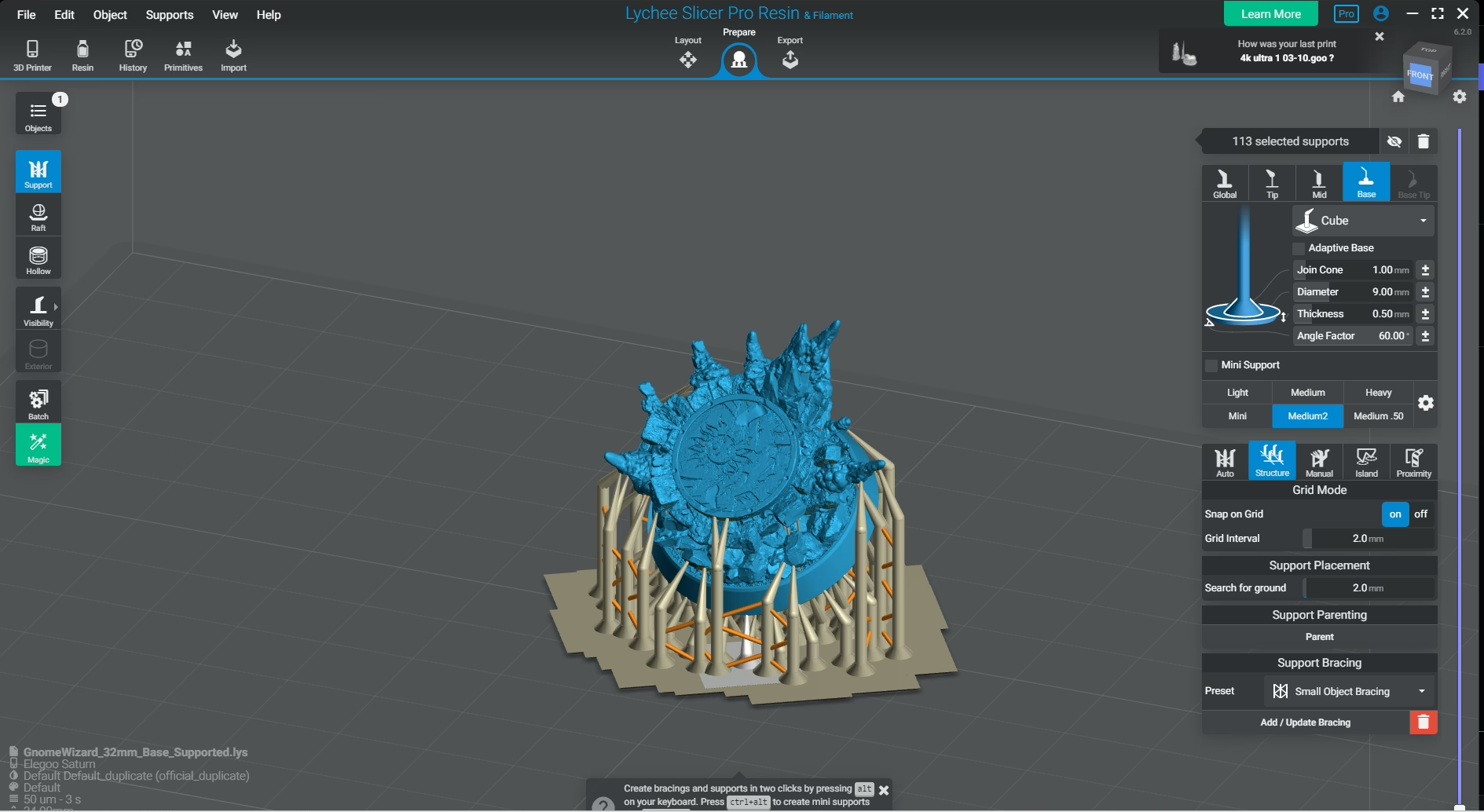
Here’s where we take things up a notch: alongside STL, every collection from our library includes a Lychee file, already pre-supported and ready to tweak however you like. You can modify supports, scale models, and even save your custom setup as a 3MF for your own printer. It’s flexibility at its best.
FBX Files
The FBX format is more common in animation and game design, as it carries meshes, textures, and rigging information. While it’s not typically used for printing, it’s handy for creators who like to customize or pose their models before slicing. It’s less about printing and more about creative freedom — a file for the storytellers behind the printer.
Where Can I Find 3D Printable Files?
Glad you asked. If you’re looking for 3D printable files that are not only beautiful but designed for smooth printing, we got you covered! Every month, subscribers get access to exclusive collections of fantasy and sci-fi miniatures, crafted by professional artists and optimized for both resin and FDM printers.
You can browse and download them easily through Loot’s My Mini Factory page, where your models come pre-supported and ready to print — no hassle, no guesswork, just high-quality results.
Where to Get Free STL Files
We get it — sometimes you just want to test your setup or explore new styles before committing. If you’re not sure where to start, you can try out our Freebies! Yes, you are very welcome.
That’s why Loot Studios also offers free 3D print files, available through the 3D Printing Hero community: we want you to test away all you want before being sure of what to do with your 3D files.
Besides, it’s a great way to discover Loot’s sculpting style and see how your printer handles detailed miniatures. Once you’ve tried them, you’ll understand why thousands of hobbyists choose Loot’s models every month.

What Is the Best 3D File for FDM?
If you’re printing with FDM (filament-based) printers, STL files are your best bet. They’re simple, lightweight, and universally compatible with slicers like Cura or PrusaSlicer. Our models come optimized with clean geometry and smart supports, ensuring your FDM prints look sharp with minimal cleanup.
And What Is the Best 3D File for Resin?
Now, for resin printing, you can’t go wrong with STL or 3MF. The STL gives you precision and control, while 3MF offers extra convenience when transferring print settings between slicers. Loot Studios’ Lychee files make this process effortless, so you can focus on what matters most — bringing your miniatures to life with stunning detail.
Final Thoughts
Choosing the right 3D print file format can make or break your printing experience. Whether you’re exploring free 3D print files, testing out your first resin printer, or looking to expand your miniature collection, understanding these file types will help you print smarter — not harder.
And if you’re ready to take your printing to the next level, check out Loot Studios’ monthly collections or grab some free files from our Freebies today. Your next masterpiece is just a download away.
Loot Studios can help you print highly detailed miniatures. Choose your favorite bundle from our previous releases or sign up for Fantasy or Sci-Fi to receive at least one new bundle every month. You can also check out some tips on our YouTube Channel.

Luiza Romagnoli is an autistic Brazilian woman, journalist, and obsessed with RPG. She has been writing since she can remember, but it was in 2017, posting texts on Instagram, that she began to take it seriously. She has a poetry book published by Patuá Publishing House: sirva o chá. Nowadays, Luiza is a multi-hyphenned professional: she’s a writer, translator, English and Spanish Teacher, and has an RPG stationery store: Papelaria do Aurel. Although having all these jobs almost leave no room for her D&D sessions, she still loves them.