From Your Feedback to Loot FDM
How months of testing, development, and collaboration with our community brought a new way to print to Loot Studios.
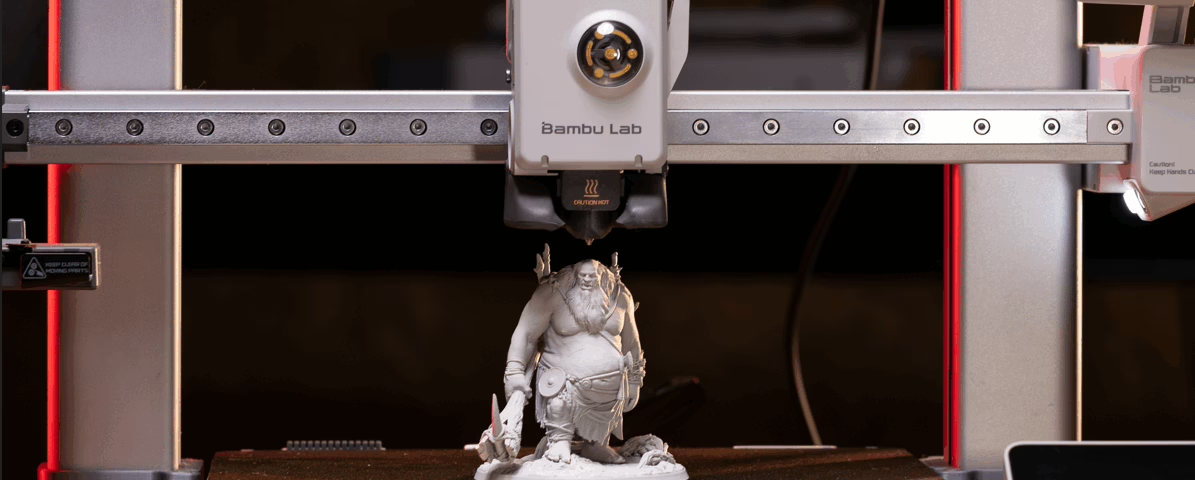
Starting October 1: Resin + FDM-ready files in every new Fantasy bundle.
Same subscription, same price.
Optimized for Bambu Lab with a 0.2mm nozzle.
Quick Menu:
- It Started With a Question
- What Is Loot FDM?
- What Will Be Available at Launch?
- What Can You Print With Loot FDM?
- What Do I Need to Get Started?
- What Happens to My Existing Loot Bundles?
- FDM FAQ
For years, Loot Studios has been focused on creating detailed 3D printable miniatures for Resin printing. But over time, we started hearing the same question more and more often from our community:
“When will Loot offer FDM files?”
We saw the questions in our community, in conversations with subscribers, and in the feedback we receive from the people who print and enjoy our models every month.
We knew FDM printing was becoming more capable. We also knew that simply taking our existing Resin files and converting them would not be enough.
So we decided to investigate what was actually possible. And that investigation became a much bigger project than we initially expected.
It Started With a Question
Our 3D development team is constantly following new technologies and developments in the 3D printing world.
As FDM printers continued to evolve, we started seeing new possibilities for printing smaller, more detailed models than what had traditionally been associated with filament printing. That raised an exciting question for us:
Could we bring the level of detail and character that Looters expect from our 32mm miniatures into an FDM experience?
We didn’t want to make an FDM version simply because we could. We wanted to understand what we could do with the technology, how far we could push it, and whether we could create an experience that genuinely added value for our subscribers.
So our 3D team started testing. And testing. And testing some more.
Months of Testing and Development
Over several months, our team invested a significant amount of time into FDM printing experiments. We tested different approaches to printing, different model configurations, different support strategies, different scales, and different settings.
One of the most important discoveries was the combination of a Bambu Lab printer with a 0.2mm nozzle.

This setup gave our team the level of control and detail we were looking for, since our goal was not simply to make a miniature printable. We wanted to make a 32mm miniature that still looked and felt like a Loot miniature.
The results were extremely encouraging! With the right combination of printer, nozzle, settings, model preparation, and supports, we were able to achieve a level of detail that surprised even us.
In some of our tests, the resulting 32mm FDM prints reached a level of visual detail that made the difference between Resin and FDM much less obvious at a glance. That was a very exciting moment for our team, because it meant that FDM wasn’t just another way to print.
It could become another way to experience Loot.

But Getting a Good Print Was Only the Beginning
We quickly learned that achieving a good FDM print wasn’t just about finding the right printer settings. The models themselves needed to be prepared specifically for FDM, since FDM printing behaves differently from Resin printing: small and delicate areas can require different approaches, and parts that work well in a Resin workflow may need to be adjusted to become more reliable when printed with filament. This is why our FDM-ready files are not simply converted Resin files.
We remodeled specific parts of the 3D model, refining certain areas to work better with FDM while keeping the Loot quality you expect.
The goal is to preserve the original silhouette, proportions, and personality of the miniature while making the necessary changes to enhance its printability and reliability on an FDM printer. Sometimes, this means making a delicate part slightly stronger; other times, it means adjusting the way different parts connect so they can survive the printing process and still work as an actual gaming miniature.
For example, a very thin dagger may work perfectly well at its original scale in Resin. For FDM, that blade may need a small thickness adjustment so it can print reliably without losing the look of the original weapon. We may also add a small connection point between the dagger and the character’s clothing to provide additional structural support during printing. These may seem like small changes, but they can make a meaningful difference when it comes to reliability.
This work also led us to develop and refine a methodology for creating supports specifically for FDM printing. That was where our community became an important part of the project.
We Asked Our Community to Help Us Test
We didn’t want FDM to be developed in isolation. After our initial internal testing, we started a new phase of validation with Loot customers. More than 100 Looters generously took part in the process, printing models in their own homes and giving us feedback about their experiences.
They didn’t just tell us whether a model printed successfully. They gave us information about supports, print quality, failures, difficult areas, settings, support removal, and the overall experience. That feedback was incredibly valuable.
It helped our team identify areas that needed improvement and gave us a much better understanding of how our models behaved outside of our own testing environment. Our testing also showed us where we still had work to do.
Some testers experienced challenges with delicate parts, supports, adhesion, and print consistency. Those issues were not something we wanted to ignore. They became part of the development process and helped us continue refining our approach.
That is what made the testing so important. It wasn’t simply about proving that FDM worked.
It was about learning how to make it work better.

From Testing to FDM-Ready
As the testing progressed, our team began building a more structured methodology for FDM.
The experience and feedback we collected helped us refine how we approach:
- Specific parts of the 3D model
- Delicate areas
- Support placement
- Support connections
- Print reliability
- Model orientation
- FDM-specific preparation
This became the foundation for what we now call FDM-ready. FDM-ready means that a model has been specifically prepared and refined to work better with FDM printing. It is not simply a Resin model placed into an FDM slicer.
We believe that distinction is important.
Our goal is to create files specifically prepared around the strengths and limitations of FDM, while keeping the identity and character of the original Loot models intact.
What Is Loot FDM?
Starting October 1, 2026, every new Fantasy bundle will include both Resin and FDM-ready files at no additional cost. That means your subscription isn’t changing.
Same subscription. Same price. More ways to print.
Resin isn’t going anywhere.
Your Resin files remain available and unchanged. FDM is an additional option for subscribers who want to explore filament printing or already have an FDM printer as part of their setup.
FDM can offer a different printing experience, with advantages such as:
- Easier setup and maintenance
- No resin handling
- No washing or curing
- A simpler post-processing workflow
It can also make 3D printing more approachable for people who may have been interested in trying it but were hesitant about the additional steps involved with Resin printing.
And for experienced FDM users, it gives you another way to enjoy the Loot models you already love.
What Will Be Available at Launch?
We’re very excited to have the first FDM-ready content prepared for the October 1 launch.
For active subscribers, the initial FDM-ready lineup includes:
- Welcome Pack 1
- Rise of Draconians
- Ship Ahoy
- Destroyer’s Armageddon
- October’s current Fantasy bundle
The Welcome Pack has also been fully updated and prepared for FDM, giving subscribers a dedicated starting point for exploring the new workflow.
As we continue developing the catalog, selected previously released Fantasy bundles and models will gradually receive FDM support as well.
Not every previously released Fantasy bundle will have FDM immediately, and there is no announced timeline for converting the entire catalog.
Our priority is to make sure the FDM content we release meets the quality and reliability standards we want for Loot.
What Can You Print With Loot FDM?
Our initial FDM focus is on 32mm miniatures, terrain, and props.
The standard scale remains 32mm, keeping FDM miniatures compatible with the rest of the Loot Studios catalog and your existing tabletop collection.
Some pieces outside the standard scale may be identified as Epic Scale when they are available as FDM-ready files. This terminology applies specifically to FDM.
At launch, 75mm miniatures and busts are not available in FDM format.
FDM support is also currently planned for Fantasy content only. Sci-Fi bundles do not currently have FDM.

What Do I Need to Get Started?
Our initial development and testing focus on the Bambu Lab ecosystem.
For the best initial experience, we recommend:
- A supported Bambu Lab printer
- A 0.2mm nozzle
- Bambu Studio
- Bambu Lab PLA basic
- The indicated FDM profile, with the Bambu Lab A1 setup as our initial reference
For the best level of detail, using a 0.2mm nozzle and FDM-ready models is an important part of the intended setup.
Most FDM printers come with a 0.4 mm nozzle, which offers good quality and faster print times for larger models, terrain, and props.
Other FDM printers may work, but our initial testing, documentation, and support are focused on Bambu Lab printers.
As we continue developing the project, we hope to expand our resources and support for other printers and filaments as well.
If you’re new to FDM printing or want to see the full process in action, check out our FDM 101 video for a step-by-step introduction from setup to your first printed mini. Click the image below to watch the video 👇

What Happens to My Existing Loot Bundles?
This is one of the most important parts of the new system.
If you are an active subscriber and own an eligible Fantasy bundle when its FDM-ready version becomes available, the FDM files will be automatically added to your library at no additional cost.
You don’t need to repurchase the bundle. You don’t need to request the files. They will simply become available to you.
If you are a former customer who is no longer subscribed, you will not receive new FDM updates for previously owned bundles while you remain inactive.
If you become an active subscriber again, you will be able to receive future eligible FDM updates.
This distinction is important because we want to be transparent about how FDM updates are delivered.

Resin Still Matters
We also want to make one thing very clear: Nothing about Loot FDM is replacing Resin. Resin remains an important part of what we do.
The introduction of FDM does not change our Resin files, our Resin-focused experience, or the way Resin content is delivered.
Instead, we are expanding the ways you can use the content that comes with your Loot subscription. Some projects will still be better suited to Resin.
Others may be perfect for FDM. And sometimes, you may simply want to choose based on the printer you have available that day. We want Loot to give you that choice.
As the FDM project launches, there is no additional cost, no subscription price increase, and no change to the Resin experience.
This Is Just the Beginning
When we started this project, we didn’t know exactly where it would take us. We knew that FDM technology was evolving. We knew our customers were asking for it.
And we knew that if Loot was going to enter the FDM space, we wanted to do it properly. That meant investing time in research.
It meant testing. It meant remodeling and refining specific parts of our models. It meant developing new support approaches.
And, importantly, it meant listening to the people who actually print our models. The result is something we’re genuinely proud to share with you. But we also see this as the beginning of a new chapter, not the end of the project.
There is still more to learn, more printers to explore, more models to prepare, and more ways we can improve the FDM experience. And we want to keep doing that together with our community.
Thank you to everyone who tested files, shared photos, reported problems, answered surveys, and gave us honest feedback throughout this process. Your feedback helped turn an idea into something we can now bring to the entire Loot community.
Same subscription. Same price. More ways to print.
Welcome to Loot FDM.

FDM FAQ
Want to go deeper?
We’ve put together a detailed FDM FAQ covering everything from supported printers and nozzles to file availability, eligibility, printing setup, and more.
If you’re new to FDM printing, we’ll also be providing onboarding materials and guides to help you get started.
And as always, our Support team and community are here to help.